online receipt book: Streamline Invoicing & Receipts
Remember those old-school paper receipt books? The ones with the flimsy carbon copy paper that always smudged? An online receipt book is the modern, digital answer to that. Think of it as a smart, central place for all your business transactions, letting you create, send, and track receipts in just a few clicks from your laptop or phone.
It’s more than just a way to record a sale; it’s a tool for actively managing your business finances.
Understanding The Modern Online Receipt Book
A paper receipt book is a bit like a dusty old ledger—it’s a simple, manual log that just sits there. An online receipt book, on the other hand, is built for the way we work today. It's less of a static record and more like a financial assistant that you can carry around in your pocket.
This shift is a game-changer for freelancers, small business owners, and anyone in the service industry. When you’re juggling everything yourself, you need to document transactions quickly and professionally. It’s not just good practice; it's how you maintain healthy cash flow, build trust with clients, and keep your sanity during tax season. The whole point is to ditch the slow, mistake-prone paper trail for a fast and reliable digital system.
Key Functions and Benefits
An online receipt book pretty much handles the entire documentation process for you. Instead of scribbling down details on a tiny slip of paper, you just fill out a digital template. And instead of handing over a crinkled receipt, you can send a clean, professional PDF straight to your client’s email.
This modern approach brings some fantastic perks right away:
- Instant Creation and Delivery: You can generate and email a receipt before a customer has even walked out the door or before a client has hung up the phone.
- Professional Branding: It’s so easy to add your logo, brand colors, and contact details. Every single receipt becomes an opportunity to reinforce your professional image.
- Reduced Errors: Forget fumbling with a calculator. The system automatically calculates taxes and totals, which means no more embarrassing (and potentially costly) math mistakes.
- Anywhere, Anytime Access: Because everything is stored digitally, you can pull up your entire sales history from any device, wherever you are.
An online receipt book isn’t just about making one-off receipts. It's about creating a secure, searchable, and instantly available archive of your business's financial life. This gives you a rock-solid system for tracking income, managing expenses, and making tax time a breeze.
To give you a quick snapshot, here’s a look at what an online receipt book brings to the table.
Online Receipt Book At a Glance
| Feature | Benefit for Your Business |
|---|---|
| Digital Templates | Create consistent, professional-looking receipts in seconds. |
| Automated Calculations | Eliminates manual math errors for taxes and totals. |
| Cloud Storage | Access all your records securely from any device, anywhere. |
| Instant Sending | Email receipts directly to clients for faster, paperless transactions. |
| Custom Branding | Add your logo and brand colors to reinforce your professional identity. |
| Searchable Archive | Quickly find any past transaction without digging through shoeboxes. |
This simple shift from paper to digital can make a huge difference in how smoothly your business runs day-to-day.
The Growing Market and Why It Matters
Moving to digital isn't just a small trend; it's a massive shift in how businesses operate. The online receipt generator market is expected to become a multi-million-dollar industry by 2033. While big names like QuickBooks and Wave Financial are major players, there's also a whole ecosystem of specialized tools popping up. This growth is happening because people want more than just a basic receipt—they want features like automatic expense tracking and smooth integration with their accounting software.
This expanding market means you have more choices and better tools than ever before. Whether you're a freelance photographer, a coffee shop owner, or a general contractor, there’s a solution out there designed for your specific needs. Tools like ReceiptMake offer a dead-simple way to create professional receipts, with tons of templates ready to go for any industry.
At the end of the day, using an online receipt book helps you save time, cut down on daily hassles, and show your clients that you’re a modern, organized professional.
Why It's Time to Ditch Your Paper Receipt Pad
Making the leap from a paper pad to an online receipt book is more than just a small tweak to your workflow. It's a genuine upgrade that seriously impacts your business's efficiency and professional image. The most obvious perk is the money you'll save right away. Just think about it—no more buying paper books, printer ink, or bulky filing cabinets to store everything.
But those savings, while nice, are just the tip of the iceberg. The real game-changer is how much time you get back. Picture this: you finish a job, and before your client has even walked out the door, a clean, professional receipt is already in their inbox. Each transaction takes seconds, not minutes, and those minutes add up fast over a busy week.
Look More Professional and Get the Numbers Right
Let's be honest, one of the biggest problems with old-school paper receipts is human error. Sloppy handwriting, a quick math mistake, or a smudged carbon copy can cause real headaches and make you look unprofessional. An online receipt book just gets rid of those problems.
Digital templates keep everything looking consistent and sharp. The math is done for you, so taxes and totals are always spot-on, saving you from embarrassing and potentially costly mistakes. That precision doesn't just protect your bottom line; it shows every customer you're a serious professional. If you need to break down costs, using a detailed itemized receipt template makes every charge crystal clear.
Your Records, Safe and Instantly Accessible
Going digital also means your records are way more accessible and secure. When you use an online system, every receipt is stored safely in the cloud. You can pull them up from anywhere—your computer, tablet, or even your phone.
That means no more panic attacks over a lost receipt book or one that's been damaged by a coffee spill. Instead of digging through a shoebox for a specific transaction from last March, you can find it with a quick search. This is a lifesaver when you're dealing with a customer question, processing a return, or getting your books in order.
Moving to digital receipts turns a clunky, paper-based chore into a smart, data-driven asset. Suddenly, your transaction history is a secure, searchable database that makes bookkeeping and tax season so much less painful.
This isn't just a trend; it's the new standard. The market for digital receipts is booming, and in Europe alone, the email receipt segment is on track to hit $403.62 million by 2030. Plus, digital receipts get seen—they have open rates as high as 75%, which blows typical marketing emails (at 20-25%) out of the water. This makes them a surprisingly effective way to stay connected with your customers. You can learn more about the growth of the digital receipt market and what it means for businesses like yours.
The Right Receipt for Any Situation
An online receipt book is incredibly versatile, making it a must-have tool for almost any kind of business. It doesn't matter if you're a freelancer sending an invoice, a shop owner ringing up sales, or a contractor taking a cash payment—there's a digital option ready to go.
You can instantly create the right kind of proof of payment for any scenario:
- Sales Receipts: For everyday product or service sales, a sales receipt template gives you a clean, complete record.
- Cash Receipts: When you're paid in cash, a cash receipt template provides clear and specific proof of payment.
- Donation Receipts: If you're a non-profit, you can easily issue official acknowledgements with a donation receipt template.
By switching to an online receipt book, you're not just updating one small task. You're adopting a smarter, more reliable way of doing business that pays off with every single transaction.
What to Look for in a Great Online Receipt Book
Not all digital receipt tools are created equal. A basic generator might check a box, but a truly great online receipt book turns a simple chore into a smart business move. It’s more than just a piece of paper (or a PDF); it’s an asset for your brand, a guarantee of accuracy, and a final, professional touchpoint with your customer.
The best tools are designed with the real world in mind, packed with features that actually help small businesses and freelancers. These elements work together to save you time, eliminate mistakes, and make sure you look polished with every single transaction.
Customizable Templates and Professional Branding
Think about it: your receipt is often the very last thing a client sees after a sale. A generic, plain-text document is a huge missed opportunity. A top-notch online receipt book lets you put your brand front and center, turning that simple record into a mini marketing tool.
You should be able to easily add your business logo, choose brand colors, and include your contact info. This consistency builds recognition and trust. When your receipt looks professional, it sends a clear signal that you care about the details, which says a lot about the quality of your work.
A freelance graphic designer, for instance, can pick a sleek, modern template that echoes their portfolio. A local bakery might go for something warmer and more colorful. The goal is to create a seamless experience from start to finish. You can find a huge variety of professionally designed receipt templates to find a style that fits your business perfectly and helps you stand out.
Automated Calculations for Taxes and Totals
Doing math by hand is just asking for trouble. One tiny slip-up on a receipt can lead to awkward client conversations, a mess in your books, and a hit to your credibility. That's why automated calculation is probably the most critical feature of any reliable online receipt book.
When you punch in your line items, the system should instantly and correctly calculate the subtotal, tack on any taxes, and give you the final amount. It completely removes the risk of human error.
The real benefit here is peace of mind. You don't have to pull out a calculator or second-guess yourself. The software handles the numbers, letting you focus on what you do best.
This is especially helpful for complex orders or when dealing with different tax rates. If you’re breaking down a project into multiple services, an itemized receipt with automatic math ensures every piece is tallied correctly. It gives your client total transparency and makes them confident in what they’re paying for. This level of precision is a non-negotiable part of being a professional.
Multi-Currency Support for Global Business
These days, your next customer could be halfway across the world. If you work with international clients or travel for business, multi-currency support is an absolute must. A good online receipt tool will let you issue receipts in different currencies without any fuss.
This feature does more than just make life easier for international customers—it shows you’re a serious, globally-minded business. Your client sees the total in a currency they actually use, which eliminates confusion and saves them the headache of doing the conversion themselves.
Here's why multi-currency support is a game-changer:
- Better Client Experience: It provides instant clarity and convenience for your international customers, making them more likely to work with you again.
- Stronger Professional Image: It signals that you're equipped to handle business on a global scale, which can set you apart from the competition.
- Simpler Bookkeeping: It helps you keep clean, accurate records for sales made in different currencies, which your accountant will thank you for.
Secure Storage and Versatile Sharing
So you’ve created the receipt. What happens next is just as important. A paper receipt can get lost, crumpled, or tossed in the trash. A modern online receipt book gives you secure cloud storage, essentially creating a digital filing cabinet for every transaction you’ve ever made. Your records are safe, searchable, and available whenever you need them.
Beyond just saving them, you need flexible ways to get receipts to your clients. The right tool makes delivery effortless.
Look for a tool that gives you a few different options:
- Direct Emailing: Send a polished receipt straight to your client’s inbox with a single click.
- PDF Downloads: Generate a clean, universal PDF file that clients can easily save or print for their own records.
- Printing Options: For those times when a physical copy is still needed, the ability to print directly from your browser is key.
These features make sure that managing and sending your receipts is just as easy as creating them in the first place.
How to Create a Professional Receipt in Minutes
Making a polished, professional receipt doesn't have to be a complicated task. In fact, with a good online tool, you can create and send one in less time than it takes to brew a pot of coffee. The whole process boils down to three simple steps that ensure you get everything right and leave a great impression.
Let's walk through just how quick it is to generate the perfect receipt every single time. This is the kind of system that helps freelancers and small businesses manage their money, get paid faster, and look professional without any of the usual fuss. Honestly, the whole thing takes less than a minute.
Stage 1: Choose Your Foundation
First things first, you need to pick the right starting point for your receipt. Think of it like choosing the right kind of stationery—the format should fit the occasion. A good online receipt book will have a library of templates designed for different situations, so you’re never starting from a blank page.
Picking the right template sets the tone and makes sure the document is clear and professional from the get-go. You don’t have to mess with layouts or formatting; just pick the style that matches the sale.
Here are a few common scenarios and the templates that fit them best:
- For everyday sales: A standard sales receipt template is your best bet. It has all the essential fields for products or services.
- For in-person payments: When a customer pays with cash, a dedicated cash receipt template offers clear proof of payment.
- For detailed projects: If you need to break down costs for a bunch of different items or services, an itemized receipt template gives you the structure you need for total clarity.
Starting with the right template just makes the next steps even easier.
Stage 2: Fill in the Details
Once you’ve got your template, it’s time to plug in the specific details of the transaction. This is where an online receipt book really shines, making data entry quick and almost impossible to mess up. You’ll just move from one clearly labeled field to the next, adding the information needed to create a complete and proper record of the sale.
You’ll start by adding your business details and logo, which most tools will save for you to use again. Then, you'll enter your client’s information. The real meat of the receipt is the itemized list, where you describe what you sold. As you type in quantities and prices, the system automatically calculates the subtotal, adds taxes, and gives you the final amount. No more manual math errors!
The goal here is to go from a blank slate to a detailed, accurate record in seconds. A simple interface guides you through every field, from item descriptions to the payment method, so nothing gets missed.
Finally, you can add any personal touches, like a quick thank-you note, your payment terms, or a return policy. This step is all about getting the right information into the template quickly and accurately.
Stage 3: Finalize and Send
The last step is all about getting the receipt where it needs to go. With all the details filled in and the totals double-checked by the system, your receipt is ready. A modern online receipt book gives you a few different ways to finalize and share the document, making things easy for both you and your customer. It’s all designed for instant action, so you can close out the transaction right then and there.
You have a few ways to wrap things up:
- Generate a PDF: With a single click, you can create a clean PDF file. It’s perfect for your own records or for attaching to an email.
- Email Directly: Many tools let you send the receipt straight to your client’s inbox from the platform, which saves you a step.
- Print a Copy: For customers who still like a piece of paper, you can print the receipt right from your browser.
After you send it, a digital copy is automatically saved to your account, keeping your online receipt book organized and current. This three-step workflow—choose, fill, and send—is really all it takes. You can try it yourself and generate a custom receipt in under a minute to see just how simple it is.
Digital Receipts Versus Paper Receipts
Let’s be honest: when you think of a receipt book, you probably picture a flimsy pad of carbon-copy paper. But to really grasp why an online receipt book is such a game-changer, it helps to put the old-school paper pad right next to its modern digital counterpart.
The choice isn't just about trees versus technology. It hits at the heart of your business's efficiency, security, and even how professional you look. While both a paper slip and a digital file serve to prove a transaction, how they get the job done couldn't be more different.
A paper receipt is a one-and-done deal. It's something you can hold, but it's also incredibly fragile. It can get lost in a drawer, ruined by a spilled coffee, or fade into illegibility over time. An online receipt, on the other hand, creates a secure, permanent record that’s backed up and available whenever and wherever you need it.
Weighing the Key Differences
Let's break this down into what really matters for small business owners and freelancers: cost, speed, security, and staying organized. On the surface, a paper book from the office supply store seems cheap. But what about the hidden costs? The time spent on manual data entry, the space needed for storage, and the headache of losing a crucial receipt all add up. A digital solution might have a small upfront cost, but it pays you back tenfold in saved time and avoided mistakes.
Security is another huge one. A misplaced receipt book could leak sensitive customer info or your own business details. Digital receipts are stored on encrypted servers, offering a level of security that a paper book in your glove compartment simply can’t compete with. That’s a big deal for building and keeping client trust.
Cost and Environmental Impact
Even with all the digital options, the traditional carbonless receipt book market is still valued at a surprising $1.18 billion globally in 2024. This is mostly in industries where internet access is spotty or physical multi-copy documents are still the norm. You can read more about the surprising endurance of paper receipt books if you're curious about the industry.
For most businesses today, though, the ongoing costs of paper, ink, and physical storage just don't make sense. And let's not forget the environmental angle. Going digital means no more paper waste, which shrinks your carbon footprint. It’s a small detail, but it’s one that lines up with what many modern consumers expect.
Accessibility and Organization
Picture this: a client calls you about a job you did ten months ago. With a paper system, you’re now digging through dusty file boxes, hoping to find the right slip. With an online receipt book? You just type their name into a search bar and have the receipt in seconds. That kind of instant access is a massive win for customer service and a lifesaver come tax time.
A paper receipt is a single piece of data. A digital receipt is an entry in a searchable, sortable database. This fundamental difference transforms record-keeping from a reactive chore into a proactive business tool.
This infographic lays out the simple, three-step flow for creating a digital receipt.
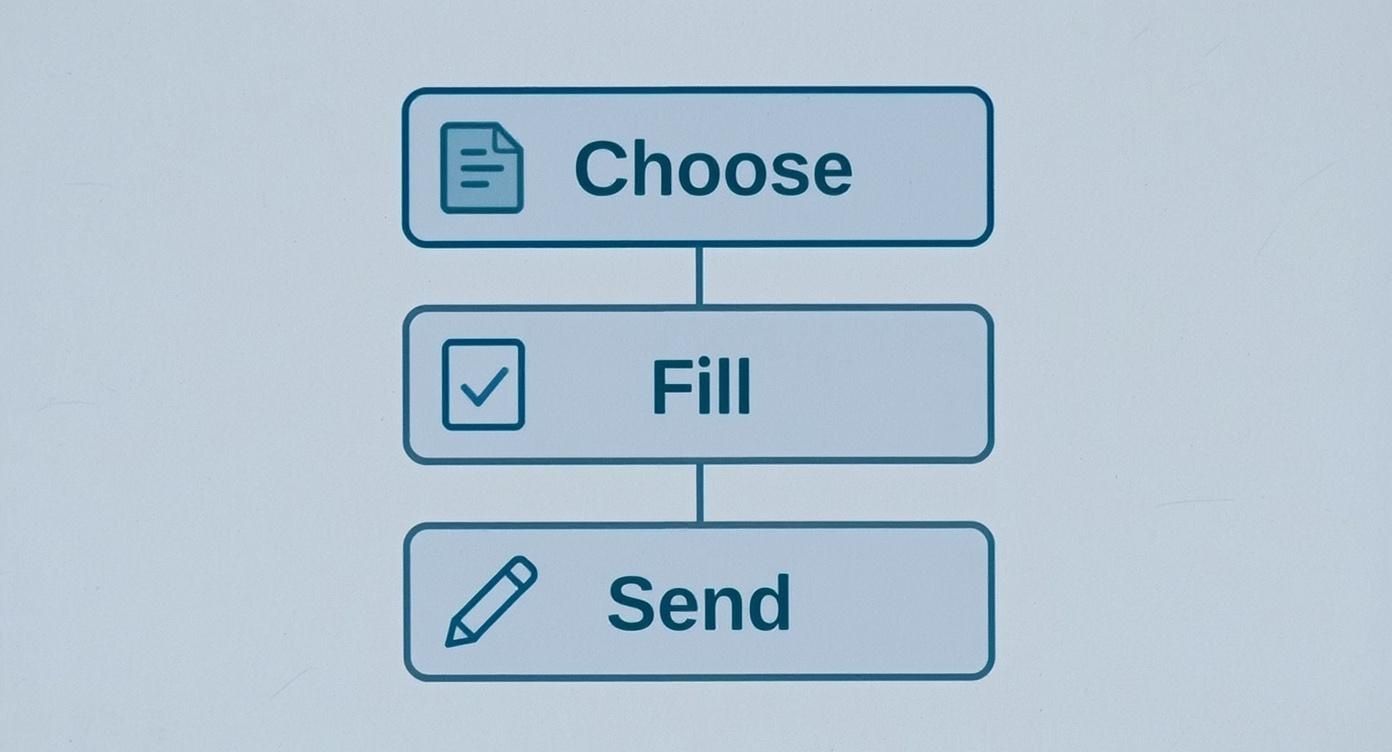
As you can see, the workflow is designed to be fast: pick a template, fill in the details, and send it off. It’s a world away from manual methods.
A Head-to-Head Comparison
To make the choice crystal clear, let's look at a direct comparison. Whether you’re creating something straightforward like a parking receipt template or a more detailed service receipt template, the digital advantages really stack up.
Online Receipt Book vs Traditional Paper Book
Here’s a breakdown of how the two methods compare across the key areas that impact your daily operations.
| Attribute | Online Receipt Book | Paper Receipt Book |
|---|---|---|
| Speed | Instant creation and email delivery in seconds. | Manual writing, tearing, and physical hand-off. |
| Cost | Low subscription fees or free; no physical materials needed. | Ongoing costs for paper books, ink, and storage. |
| Security | Encrypted and backed up in the cloud. | Vulnerable to loss, theft, and physical damage. |
| Accessibility | Searchable and accessible from any device, anywhere. | Limited to its physical location; difficult to search. |
| Professionalism | Customizable with logos for a consistent, branded look. | Often generic, with a risk of illegible handwriting. |
| Accuracy | Automated calculations for totals and taxes eliminate errors. | Prone to human error in manual calculations. |
While paper receipts aren't going extinct tomorrow, the benefits of using an online receipt book are pretty overwhelming for almost any modern business. It’s not just about "going paperless"—it's about working smarter, staying more secure, and being far more efficient.
Keeping Your Digital Receipts in Order: A Few Best Practices
Making a great-looking receipt is one thing, but how you handle it after you click "download" is what really matters. This is where your online receipt book goes from being just a tool to the backbone of your financial system. Good management habits keep your records clean, safe, and ready for tax time without any last-minute panic.
These aren't complicated rules. It's all about building a simple, consistent system. By spending a little time setting things up right from the start, you'll make sure every transaction is accounted for and easy to find, giving you total peace of mind.
Name Your Files Like a Pro
The first rule of digital organization? Give your files sensible names. If you don't, your downloads folder will quickly become a black hole of files named "Receipt_001.pdf" and "Final_Receipt_Copy.pdf." A consistent naming system means you can find any specific receipt in seconds.
Here's a simple format that works wonders:
- YYYY-MM-DD_[ClientName]_[Invoice#].pdf
- For example: 2024-10-26_SmithServices_1045.pdf
This structure naturally sorts your files by date and lets you instantly search by client or invoice number. Whether you're using a simple receipt template or a more detailed service receipt template, sticking to this rule will keep your digital paperwork spotless.
Set Up a Smart Folder System
A good naming system needs a good folder structure to go with it. Just dumping all your receipts into one folder is the digital version of the old shoebox method—it's a mess waiting to happen. Instead, organize your folders to reflect how your business actually runs.
Try creating a main "Receipts" folder, then break it down by year, and then by month or client.
- Receipts
- 2024
- 01-January
- 02-February
- 03-March
- 2024
This kind of tiered system keeps everything neat and makes it incredibly easy to pull records for a specific time period. When your accountant asks for everything from last quarter, you won't have to spend hours digging.
Connect Receipts to Your Bookkeeping
Your online receipts shouldn't be on an island. To get the most out of them, you need to plug them directly into your accounting process. That link between the proof of payment and your financial records is what makes for accurate books and a smooth tax season.
Make it a habit to regularly enter the info from your receipts into your accounting software or spreadsheet. This keeps your income tracking up-to-date and gives you a real-time pulse on your business's financial health. A perfectly filled-out parking receipt template, for instance, has all the details you need to log that expense correctly.
Think of each digital receipt as a Lego brick for your financial reports. By consistently adding these bricks to your accounting system, you’re building a solid, verifiable record of your income that can stand up to any questions.
Finally, don't forget about legal requirements. Most tax authorities require businesses to keep financial records for several years. A quick search for your local regulations will tell you how long you need to hang onto your digital receipts. These simple habits will turn your receipt-making tool into the cornerstone of a well-organized, compliant, and successful business.
Common Questions About Online Receipts
Switching from a system you know and trust naturally brings up a few questions. When you’re thinking about moving to an online receipt book, you want to be sure it’s a solid, secure, and professional move for your business. Let’s walk through some of the most common questions I hear to help you feel confident about making the change.
One of the first things people wonder is whether digital receipts are even legal. The short answer is yes. In most places, a digital receipt holds the same legal weight as a paper one, provided it includes all the essential details of the transaction.
Can I Brand My Online Receipts?
Of course! This is actually one of the biggest perks of going digital. You can and absolutely should add your business logo to your receipts. It’s a simple way to keep your branding consistent and look professional with every sale.
For example, using a customizable receipt template lets you pop your logo on and even match your brand colors in just a few clicks. That small touch instantly transforms a basic proof of purchase into a slick piece of marketing that reinforces who you are.
How Secure Is My Data?
This is a big one, and rightly so. The good news is that your data is often far safer online than in a physical book. Reputable online receipt makers use strong encryption and store everything on secure cloud servers.
Think of it like this: a paper receipt book can get lost, damaged in a coffee spill, or even stolen, putting sensitive information at risk. A good online system is like a digital vault for your transaction history.
And what about returns? That’s simple, too. When a customer needs a refund, you just create a specific refund receipt or a credit note with the same tool. This keeps your financial records clean and accurate, closing the loop on the entire transaction.
Ready to create professional, secure, and branded receipts in seconds? Try ReceiptMake today and discover how easy it is to manage your transactions. Generate your first receipt for free.

