
How to Make a Payment Receipt That Looks Professional
Learning how to make a payment receipt is pretty simple at its core: you just need to gather the transaction details, pick a layout, and plug in the essentials like the date, what was sold, and the total amount paid. But don't let that simplicity fool you—this little piece of paper is a cornerstone of any professional business.
Why a Professional Receipt Matters More Than You Think
A payment receipt is so much more than just a slip of paper confirming a sale. Think of it as a multi-purpose tool that builds customer trust, protects your business from disputes, and keeps your financial records clean and accurate. In a world of quick digital transactions, a clear, professional receipt signals credibility and shows you care about the details.
From your customer's point of view, a well-organized receipt offers peace of mind. It makes it easy for them to handle returns, track their spending, or file expense reports. For you, it's your first line of defense if a payment ever gets questioned.
Building Trust and Ensuring Clarity
Every time you complete a sale, you have a chance to show your business is reliable. A detailed receipt clears up any potential confusion about charges, taxes, or discounts applied, which is a lifesaver for service-based businesses.
When a client can see a clear breakdown of every cost, it creates a feeling of transparency that keeps them coming back. Even for small transactions, a simple document like a Cash Sale Receipt can make the exchange feel more official and professional.
Take a freelance graphic designer, for instance. Providing an itemized receipt that lists "Logo Design Concepts" and a "Brand Style Guide" builds far more trust than just sending an invoice with a single lump sum.
Your Foundation for Financial Health
Receipts aren't just for customers—they're the bedrock of your own financial management. Having accurate records is absolutely non-negotiable for tracking revenue, understanding your cash flow, and getting ready for tax season. Without them, you're essentially flying blind and opening yourself up to major headaches if you ever get audited.
A complete and organized collection of receipts isn't just good practice—it's essential for legal compliance and proving your business expenses. Dropping the ball here can mean lost deductions and even penalties down the road.
Well-kept receipts also make bookkeeping a breeze. Just imagine trying to reconcile your bank statements at the end of the month without a clear record of each transaction. It turns into a frustrating, time-consuming puzzle. Using a standard format, like a Generic Sales Receipt, keeps everything consistent and makes your financial analysis that much easier.
Luckily, creating these documents is simpler than you might think, which brings us to the next steps.
The Anatomy of a Perfect Payment Receipt
Before you can create a payment receipt, you need to know what goes into one. Think of it like a puzzle—every single piece of information is crucial for building a complete, trustworthy picture of the transaction. If you miss even one detail, you could end up with a confused customer or a bookkeeping headache later on.
A good receipt tells the full story of a sale. It has to clearly answer the basics: who, what, where, when, and how much. Getting these elements right not only covers your bases but also gives customers the transparency they expect.
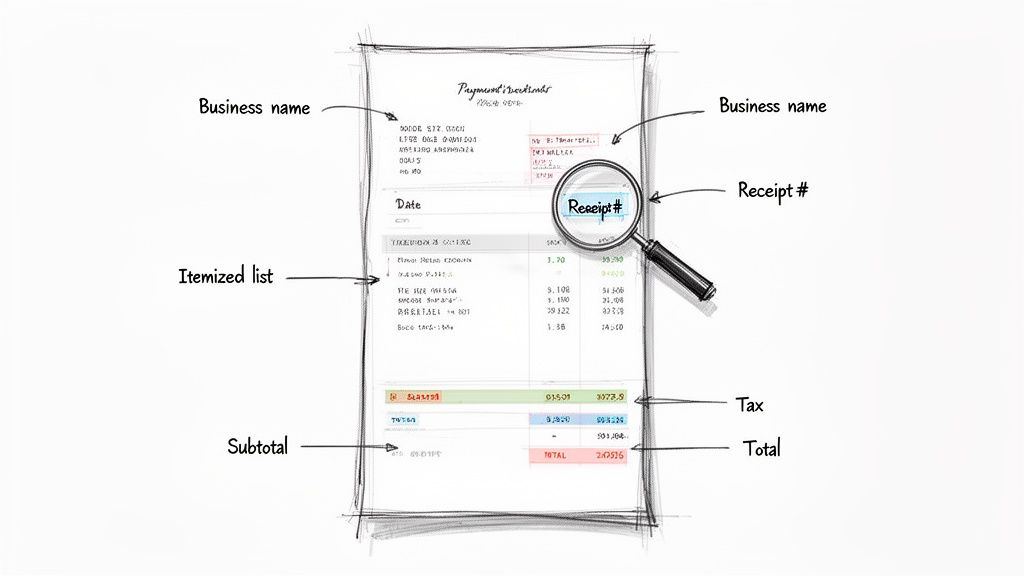
With digital payments becoming the norm, a solid receipt isn't just nice to have; it’s the foundation of trust and proper record-keeping. As fewer people carry cash, businesses have to adapt by providing professional receipts on the spot. According to McKinsey, digital wallets accounted for 51% of global point-of-sale transaction volume in 2022, a trend that’s only growing.
Let's break down exactly what a professional receipt needs. This table gives you a quick-reference guide to all the essential and recommended fields.
| Component | Description & Purpose | Status |
|---|---|---|
| Business Information | Your company's legal name, address, and contact details. It establishes who sold the goods/services. | Mandatory |
| Customer Information | The buyer's name and contact info. Crucial for services, warranties, or large purchases. | Recommended |
| Unique Receipt Number | A distinct identifier for each transaction. Essential for tracking, refunds, and accounting. | Mandatory |
| Date & Time | The exact timestamp of the purchase. Provides a clear record for both parties. | Mandatory |
| Itemized List | A breakdown of each product or service, including quantity and price per unit. | Mandatory |
| Subtotal | The total cost of all items before taxes and discounts are applied. | Mandatory |
| Taxes/Fees | A separate line item for any applicable sales tax, VAT, or other charges. | Mandatory |
| Discounts Applied | Any promotions or price reductions, clearly listed to explain the final cost. | Recommended |
| Total Amount Paid | The final, bolded figure showing what the customer actually paid. | Mandatory |
| Payment Method | How the customer paid (e.g., Credit Card, Cash, Apple Pay). Critical for reconciliation. | Mandatory |
Getting these components right every time is what separates a professional operation from an amateur one. Now, let's dig a little deeper into the most important sections.
Identifying the Seller and Buyer
First things first, you need to clearly state who you are. This might sound obvious, but it’s the bedrock of a legitimate receipt. Always include your business’s full legal name, address, phone number, and email. I also highly recommend adding your logo—it’s a small touch that instantly reinforces your brand and makes the document look polished.
Next up is the customer. For a quick coffee purchase, you probably won't need their name. But for a freelance project, a custom order, or a big-ticket item, getting the customer’s name and contact information is standard practice. It creates an undeniable link between the payment and the person, which is a lifesaver for handling returns, warranty claims, or just looking up their history.
The Heart of the Transaction
This is the real meat of the receipt. You absolutely must include an itemized list of every product or service sold. Each line needs a quick description, the quantity, the price for a single unit, and the total for that line. This level of detail eliminates any guesswork and answers a customer's questions before they even have a chance to ask.
After the list, you need a crystal-clear financial summary. This should always include:
- Subtotal: The total for all items before any other numbers are added.
- Taxes: List any sales tax or VAT as a separate line. Don't lump it in with the subtotal.
- Discounts: If you applied a promotion, show it clearly so the customer sees the savings.
- Total Amount Paid: The final number, usually in bold, showing what the customer paid.
My Two Cents: From experience, I can tell you that keeping taxes separate from the subtotal is a non-negotiable. Mushing them together creates huge accounting headaches and might even violate local tax laws. Transparency here builds trust and keeps your books clean.
A clean breakdown means no surprises for anyone. It shows exactly what was purchased and how the final total was calculated. For sales that are a bit more complex, using something like a Generic POS Receipt template can really help keep this information organized and easy to read.
Essential Administrative Details
Finally, a few small administrative details are needed to make the receipt an official document. Every single receipt needs a unique receipt number (or transaction ID). This is your best friend for tracking sales, handling returns, preventing fraud, and just generally keeping your records straight.
The date and time are just as critical, giving you a precise timestamp for the sale. And don't forget to include the payment method—was it cash, a Visa card, or Apple Pay? This tiny detail is incredibly important when you're reconciling your accounts at the end of the day and can be the deciding factor in a payment dispute. These final pieces might seem minor, but they’re what make your receipt complete, professional, and legally sound.
How to Create a Receipt in Minutes
Now that we’ve covered the essential parts of a receipt, let's get down to actually making one. You might be surprised to learn it’s incredibly simple. You don't need fancy accounting software or a graphic design degree to create a professional-looking receipt. With the right approach, you can have one ready to go in just a few minutes.
The whole process is pretty straightforward: pick a template that fits your business, plug in the transaction details, and download the finished product. This takes all the guesswork out of it and makes sure you don't miss any critical information.
Choose Your Starting Point
First things first, you need to select a layout that makes sense for your line of work. A general-purpose receipt can work in a pinch, but a template designed for your specific industry just looks more professional.
Think about it—if you run a food truck, using a Restaurant Bill Template is a no-brainer. It's built for that environment. Likewise, a driver tracking expenses would want a Gas Receipt Template to keep things clear and accurate. Picking the right template from the get-go saves you a ton of time.
Fill in the Details
Once you have your template, it's time to add the information. An online tool like ReceiptMake simplifies this with easy-to-understand fields. You’ll just type in your business info, the customer’s name, and a list of the products or services sold.
This is where you'll see the magic happen. A good receipt generator does the math for you—calculating subtotals, taxes, and the final total automatically. This really cuts down on the chance of making a costly mistake. It's also the perfect spot to upload your business logo, which adds a nice, trustworthy touch and reinforces your brand.
One of the best parts of using a dedicated tool is the instant feedback. You get a live preview that updates as you type, so you can see exactly what the final receipt will look like. This lets you spot any typos or formatting issues before you even think about hitting "download."
For any business that wants to make receipt generation seamless, it's worth looking at the bigger picture. If you're serious about streamlining your sales process, check out this ultimate guide to choosing the right POS system for your business. The right system can practically automate this whole task.
Preview and Download Your Receipt
And now for the best part. Give the live preview one last look to make sure everything is perfect, and you're ready to go. With just a click, you can download a clean, high-quality PDF.
This screenshot gives you an idea of how an online generator lays out your finished receipts, all set for you to download.
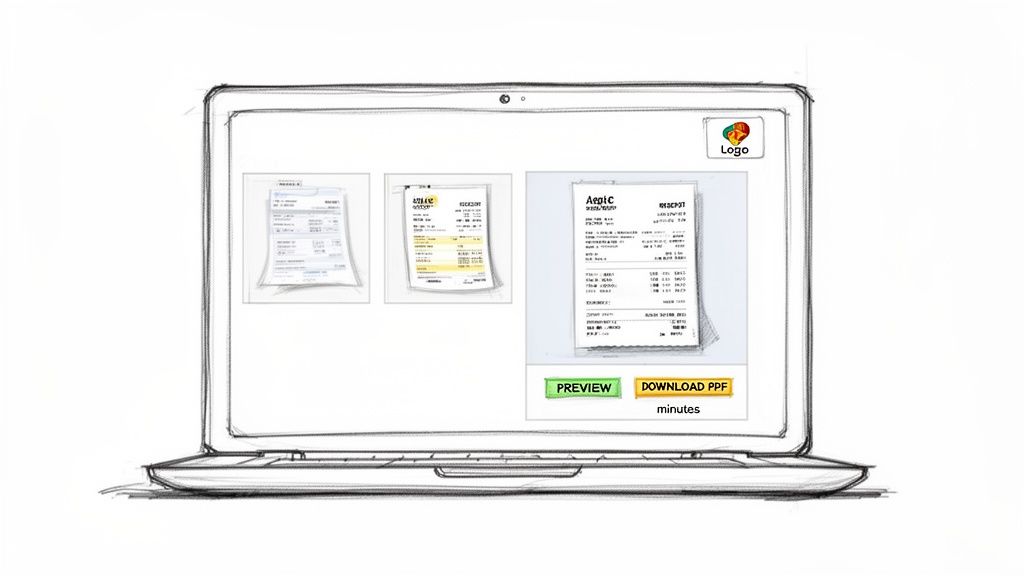
This visual check ensures your branding, line items, and totals are all correct before it ever gets to the customer. From there, you can print it out or email it directly. It’s that easy to provide instant, professional proof of purchase. Why not generate your own professional receipt and see for yourself?
As a small business owner, you're handling countless transactions, and making receipts has become more than just a task—it's a key part of your operation. With cashless payments on the rise globally, this simple three-step process is a lifesaver for staying efficient. This trend is only growing, as detailed in PwC's global payments report.
Tailoring Receipts to Your Business
Let's be honest, a generic, one-size-fits-all receipt doesn't really work. The details a freelance designer needs to include are worlds away from what a busy coffee shop requires. Your receipt isn't just a proof of payment; it’s a professional document that needs to fit your specific industry.
This is where a flexible receipt generator becomes so valuable. It lets you go beyond the standard template and add the custom touches that solve your unique business problems. You're creating a tool that fits right into your workflow and makes sense to your customers.
Real-World Examples for Common Businesses
Let's break down how this looks in practice. Imagine you're a freelance web developer. You'll probably want to add project details right on the receipt. Adding a custom notes section to specify "50% deposit for Project Alpha" or "Final payment for website launch" can save you from a lot of back-and-forth later.
A cafe owner has a completely different challenge: tips. A standard receipt template often forgets about a gratuity line, which can make things awkward. You can easily fix this by adding a dedicated line for tips or even using a template designed for services, like a Hotel Receipt Template, which already has those extra fields built in.
Then you have an e-commerce store. For them, a receipt often needs to pull double duty as a packing slip. Using a Packing Slip Template is a smart move. It clearly itemizes the products for the customer and gives your fulfillment team an accurate checklist for packing the order.
Customizations That Make a Real Difference
Getting your receipt just right is about more than just adding a few fields—it's about making it work for you. Here are a few simple but powerful adjustments you can make:
- Signature Line: This is a must-have for service providers or anyone selling high-value items. It’s your proof that services were completed or the customer received their goods in good shape.
- Currency Selection: If you have international clients, showing the total in their local currency (like EUR or GBP) is a small touch that shows you’re a pro.
- Custom Messages: Why not add a quick "Thank you for your business!" or include your return policy? You could even add a discount code for their next purchase.
A well-tailored receipt is more than just a record—it’s a powerful business tool. A signature line can be your best friend in a dispute, and a simple thank-you note can go a long way in building customer loyalty.
Handling payments requires attention to detail, and your receipts are a key part of staying compliant. For a contractor working with international clients, a receipt is the official proof of payment in a multi-currency deal. Features like automatic tax calculations make this whole process much simpler. This precision is crucial, especially as projections show EU cashless transactions are set to skyrocket. If you're curious, you can explore more payment industry statistics and trends to see how things are changing.
For businesses on the move, like a taxi service, a specific Taxi Receipt Template gives you the exact fields for fares, tips, and trip details. By browsing the different receipt templates available online, you can find a design that's already 90% perfect for your needs, saving you a ton of setup time. At the end of the day, a customized receipt tells your customers that you care about the details and take your business seriously.
Managing Your Receipts for Long-Term Success
Making a great-looking receipt is just the first step. The real hallmark of a professional business is what you do with that receipt after the sale is complete. Solid record-keeping keeps your finances organized, secure, and ready for anything—from a quick customer question to the chaos of tax season.
The key here is to think digitally. Forget the shoeboxes stuffed with faded paper. Storing your receipts on a computer or in the cloud is infinitely more efficient. Digital files are instantly searchable, which means no more digging through piles of paper to find that one transaction from last May. They're also safe from real-world disasters like coffee spills or just fading over time.
Organizing Your Digital Files
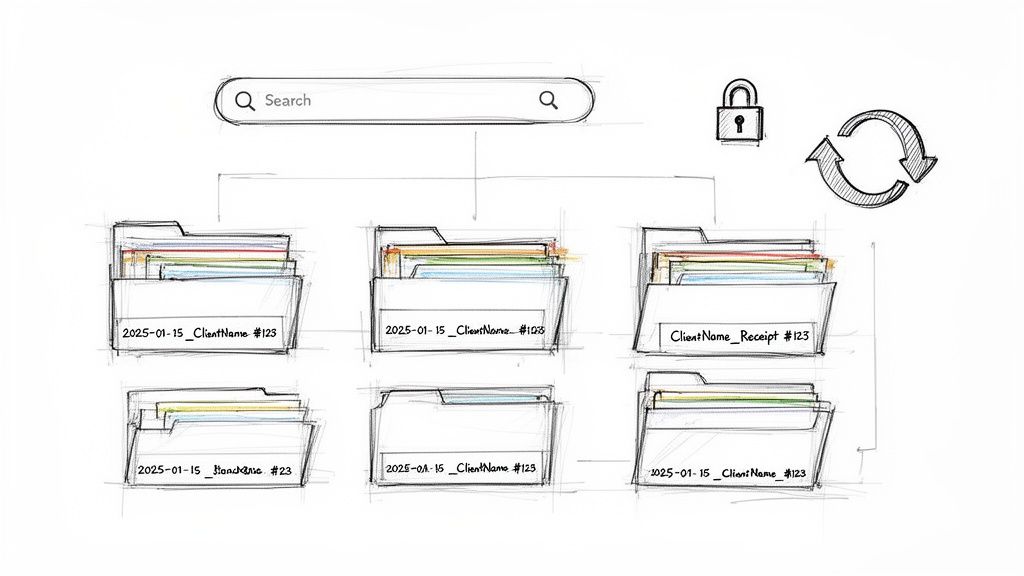
A little bit of organization now will save you a massive headache later. The best thing you can do is create a consistent naming system for your files so you can find exactly what you need in seconds.
A simple but incredibly effective format is YYYY-MM-DD_ClientName_Receipt#.
For instance, a file named 2024-10-28_SmithServices_1045.pdf tells you everything you need to know at a glance: the date, the customer, and the specific receipt number. This simple habit turns a jumbled folder into a clean, searchable archive. It's a system you can use for any type of receipt, from a basic Cash Sale Receipt to a more detailed Generic POS Receipt.
Think of your filing system as your financial safety net. A logical naming convention isn't just about being tidy—it's about making your records accessible and audit-proof. A messy system can cost you hours of stress and potentially thousands in missed deductions.
Backing up your files is absolutely non-negotiable. Save copies of your receipts to a cloud service like Google Drive or Dropbox. This simple step ensures your records are safe even if your computer decides to give up. For larger businesses handling a high volume of transactions, it’s worth looking into comprehensive enterprise document management solutions that offer more advanced features.
Legal Requirements and Professional Sharing
You also need to be aware of how long you're required to keep your records. The rules can vary by location and industry, but a solid rule of thumb for most small businesses is to hold onto financial documents for at least seven years. This keeps you covered for the vast majority of tax audit scenarios.
When you're ready to send the receipt to your customer, professionalism is key. Emailing a PDF is the industry standard for a reason. It’s secure, it creates a digital paper trail for both of you, and it looks far more polished than sending a blurry photo of a paper copy. This small touch reinforces your credibility and ends the transaction on a high note.
Got Questions About Making Receipts? We've Got Answers
Even with the best tools, you might run into a few questions when you're creating receipts. It happens to everyone. Let's clear up some of the most common things people ask, so you can create your receipts with total confidence.
Are Digital Receipts Actually Legit?
Yes, absolutely. A receipt you generate online is just as legally valid as a paper one, provided it has all the right information. The key is making sure it includes everything needed to prove the transaction took place.
That means your business details, the date, a unique receipt number, a clear list of the items or services, the grand total, and how the customer paid. Tools like ReceiptMake are built to tick all these boxes, so whether you're making a simple Cash Sale Receipt or something more detailed, you can be sure it’s suitable for your books, tax filings, or any legal needs.
Do I Really Need to Give a Receipt for Every Little Sale?
While laws can differ from place to place, my advice is always to offer a receipt for every single sale. It’s just good business. It gives your customers peace of mind and makes things like returns, warranties, or expensing the purchase a breeze for them.
For you, it means you have a spotless record of every dollar that comes in. Plus, for card or online payments, emailing a receipt is standard practice now—it’s a win-win for you and your customer.
Can I Put My Company Logo on the Receipt?
You definitely should! Adding your business logo is one of the easiest ways to look professional. Most online receipt makers, including ReceiptMake, have a simple upload feature for this.
This one small step instantly turns a generic slip of paper (or email) into a branded document that reinforces who you are. A logo makes your receipt recognizable and adds a layer of trust. It's a tiny detail that punches well above its weight.
What’s the Real Difference Between an Invoice and a Receipt?
This one trips people up all the time, but the difference is actually pretty straightforward. An invoice is a request for payment. It's the bill you send before you get paid. A receipt, on the other hand, is proof of payment. You issue it after the money has changed hands.
Here's an easy way to remember it: An invoice asks for the money. A receipt confirms you got the money.
Ready to stop worrying and start creating clean, professional receipts in a few seconds? ReceiptMake gives you over 100 templates to choose from. Just add your logo, fill in the details, and you're done—no signup needed. Give our free receipt generator a try today!

